Step-by-Step: Building My Blog with JAMStack and Google Cloud
I embarked on a journey to discover the ideal platform for my blog. My goal was to find a self-hosted solution, steering clear of popular site builders like Wordpress or Squarespace. After thorough research, I discovered JAMstack, which proved to be the perfect alternative for me. My website now operates under the JAMstack paradigm.
What is JAMstack? JAMstack is a groundbreaking web development architecture designed to transform the web by enhancing speed, security, and scalability. The term JAMstack stands for JavaScript, APIs, and Markup. JAMstack encourages a decoupled approach, where the front end is served as static assets, and dynamic functionalities are handled through APIs. This architecture provides several benefits, including superior performance, enhanced security, and simplified scaling. JAMstack incorporates developer-friendly tools and workflows, promoting exceptional productivity. Fundamental principles like pre-rendering and decoupling enable confident and resilient delivery of websites and applications using JAMstack.
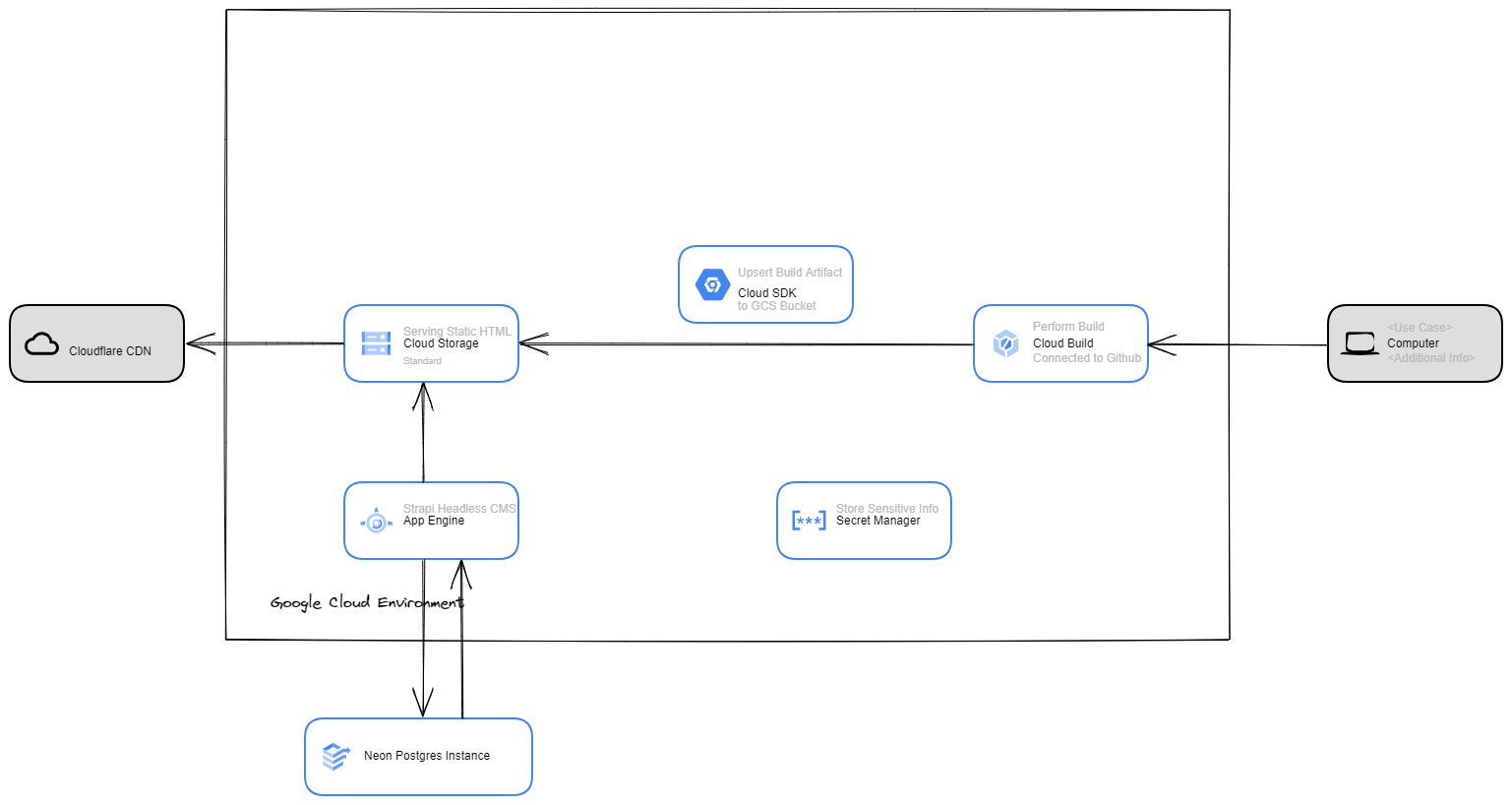
In this blog, I will explore the details of setting up the very site you're currently reading, anshumankumar.dev. Below is the solution architecture diagram:
I added the following code snippet to enable Scully to discover my Angular routes (located in src\assets\scully-routes.json):
[{"route":"/"},{"route":"/blogs"},{"route":"/contactme"}]
For the most recent information, refer to Scully's official documentation here.
Next, my quest for an ideal headless CMS led me to consider lightweight options. After extensive research, I narrowed it down to two choices: Wordpress CMS and Strapi. I chose Strapi due to its integration with Postgres and the intriguing serverless Postgres offerings, including the recently launched service, Neon. I was attracted to Neon's generous free tier and straightforward setup. Given the upfront costs of a dedicated SQL instance, serverless Postgres was a logical choice for me.
I decided to deploy my headless CMS application on App Engine. This dynamic platform scales to zero when inactive, making it a cost-effective choice for this non-mission-critical application. While there may be occasional cold start latency, it aligns well with my budget-conscious approach. Transitioning to Cloud Run is on my agenda, a move that would eliminate vendor lock-in, although it remains a work in progress at the time of writing.
Securing the highly sensitive connection string between my Strapi App and Neon was crucial, leading me to use Cloud Secret Manager. To streamline deployment, I established a straightforward CI/CD pipeline to facilitate the deployment of my Strapi App to App Engine.
To link my web app and my headless CMS, I utilized the simple REST API methods that came with the Strapi installation. To better understand the process, I referred to this link. For now, I've kept it simple, enabling GET requests for all blogs and individual blog entries via the REST API.
In conclusion, the journey of setting up your own web app may seem daunting, but with the right tools and a clear understanding of the process, it becomes a manageable and rewarding task. By leveraging the power of JAMstack, Strapi, and serverless Postgres offerings like Neon, you can create a dynamic, scalable, and cost-effective web application. I hope this blog has not only illuminated the process but also inspired you to embark on your own web development journey. Remember, the beauty of technology lies in its endless possibilities and its ability to be molded to our needs. So, go ahead and create your unique digital footprint in the world.